

Best Laptops for Work, Study, Gaming and Everyday Use Products online UK (United Kingdom)
Explore our real-time updated product directory index curated for performance, verified star metrics, and historical consumer trust rankings.


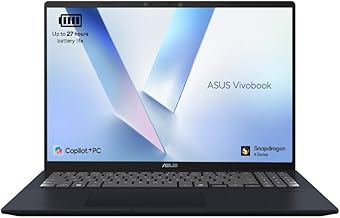


Laptops offer a practical combination of performance, portability and convenience. Unlike desktop computers, they can be carried between rooms, taken to university, used in the office or packed for travel. With many configurations available, it is important to consider how you plan to use your device before making a purchase.
For everyday activities, a laptop with a capable processor, sufficient RAM and solid-state storage can provide responsive performance for web browsing, email, document creation, streaming and general multitasking. Students may prefer a lightweight laptop that is easy to carry throughout the day, while home users may place greater emphasis on screen size, storage capacity and comfortable everyday use.
Business laptops are designed around productivity, reliability and portability. They are suitable for tasks such as working with documents, spreadsheets, video conferencing, web applications and cloud-based services. A comfortable keyboard, clear display and dependable battery can be particularly useful for people who work away from a fixed desk.
If your work involves multiple applications at the same time, look for adequate RAM and a modern processor. Solid-state drives can also help improve system responsiveness and reduce loading times. For frequent travel, consider the laptop's weight, dimensions, battery capacity and available charging options.
A student laptop needs to balance performance, portability and value. Many students use their devices for research, online learning, presentations, word processing, spreadsheets and video calls. A compact display can make a laptop easier to carry, while a larger screen may be preferable for extended study sessions.
Battery life is another important consideration when moving between lectures, libraries and other study spaces. It is also worth checking connectivity, webcam quality, keyboard comfort and storage capacity before choosing a device for education.
Gaming laptops combine portable designs with hardware intended for demanding games and graphics-intensive applications. A dedicated graphics processor can provide additional rendering performance, while a powerful CPU and sufficient RAM help support modern gaming and multitasking.
Gamers should also consider display refresh rate, resolution, cooling, storage and keyboard features. More powerful hardware can increase heat and energy consumption, so an effective cooling system and suitable power supply are important factors when comparing gaming laptops.
For commuters, students and frequent travellers, portability can be just as important as raw performance. Lightweight laptops are easier to carry and can be convenient when working from cafés, trains, libraries or shared workspaces.
Compact laptops may feature smaller screens and keyboards to reduce overall size. Before choosing a portable model, consider whether the display, keyboard layout and available ports provide enough space and flexibility for your regular tasks.
The processor plays a major role in determining how quickly a laptop handles applications and multitasking. Entry-level processors can be suitable for basic browsing and office work, while higher-performance processors are better suited to demanding software, creative workloads and gaming.
When comparing processors, consider the generation, core configuration and intended workload rather than relying on processor names alone. A modern processor paired with sufficient RAM and fast storage can provide a balanced everyday experience.
RAM affects how effectively a laptop can manage multiple active applications. Basic users may require less memory, while multitaskers, creators and gamers can benefit from larger RAM capacities. Choosing enough RAM at the time of purchase can help keep the laptop useful as your needs develop.
Storage determines how much space is available for applications, documents, photos, videos and games. SSD storage is widely preferred because it can provide faster startup and application loading compared with traditional hard drives. Consider capacity carefully if you regularly store large media files or games.
Laptop displays vary in size, resolution, panel technology and refresh rate. Smaller screens can improve portability, while larger screens can make multitasking and entertainment more comfortable. Resolution affects image detail, while refresh rate can be especially relevant for gaming and fast-moving content.
Think about where you will use the laptop most often. A device used mainly at a desk may benefit from a larger display, whereas frequent travellers may prefer a compact screen and lower overall weight.
Battery performance matters when a power socket is not always available. Actual battery life can vary according to brightness, applications, wireless connectivity and workload, so advertised figures should be considered alongside your expected usage.
Connectivity is equally important. Check the ports and wireless capabilities required for your accessories and devices. Depending on your setup, you may need USB connections, video output, audio connectivity, memory card support or compatibility with external displays and peripherals.
Start by identifying your main purpose. A laptop for email and browsing does not need the same hardware as a workstation or gaming machine. Establish a realistic budget and then compare processor performance, RAM, storage, display characteristics, battery expectations and portability.
It is also useful to consider the operating system, keyboard layout and warranty terms. UK shoppers should check that the keyboard configuration and power requirements are appropriate for the United Kingdom. By comparing the specifications that matter most to your workload, you can avoid paying for features you are unlikely to use.
The best laptop is the one that fits your actual requirements. Whether you need a dependable device for office work, a portable computer for university, a versatile machine for home entertainment or a high-performance system for gaming, comparing the right specifications can make the selection process easier.
Explore laptops with different screen sizes, performance levels, storage capacities and feature combinations to find a suitable option for your requirements. Focus on the tasks you perform most often, allow room for future needs and choose a configuration that offers the right balance between performance, portability and value.
Find laptops designed for modern work, study, entertainment and everyday computing. From compact models for portability to powerful laptops for demanding applications and gaming, the right device can make daily tasks faster and more convenient. Explore key specifications such as processor performance, memory, storage, display size, battery life and connectivity before choosing a laptop that matches your needs.