

♥ Wishlist
Compare 26 verified Car Electronics for Modern Driving products in United Kingdom. Reviews, ratings, pros, cons and buying advice updated for November 2026.


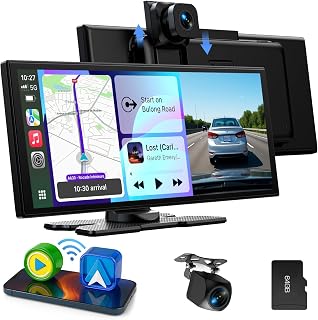


Choosing car electronics is no longer simply about adding a radio or upgrading the speakers. Modern in-car technology can cover navigation, dash cameras, parking assistance, hands-free communication, audio, charging, security, connectivity and driver convenience. The right equipment depends heavily on your vehicle, driving habits, existing technology and the features that genuinely improve your everyday journeys.
This independent buying guide explains what to look for when comparing the best car electronics products in the UK in 2026. Rather than treating every device as interchangeable, it looks at the practical differences between product types, the specifications that matter, compatibility considerations, installation requirements, reliability factors and common buying mistakes.
Popular manufacturers in the wider car-electronics market include Garmin, Nextbase, Pioneer, Sony, Kenwood, Alpine, TomTom and other established automotive technology brands. Brand reputation can be useful when comparing products, but the model's actual specifications, compatibility, support arrangements and intended use should always be checked before purchase.
Car electronics is a broad category covering powered or digitally controlled equipment designed for use inside, around or alongside a vehicle. Some products are designed to replace existing factory equipment, while others are portable accessories that can be installed without modifying the vehicle's original system.
Common categories include:
Because these products perform very different jobs, the best option for one driver may be completely unsuitable for another. A compact dash camera, for example, should be assessed differently from a double-DIN multimedia receiver or a dedicated navigation device.
The most important starting point is compatibility. Before comparing features or prices, determine whether the product is physically, electrically and electronically suitable for your particular vehicle.
Car electronics can vary significantly between vehicles, even when two cars appear to have similar dashboards. Factors such as the model year, trim level, factory head unit, steering-wheel controls, wiring configuration, dashboard dimensions and existing reversing-camera equipment can all affect compatibility.
For replacement stereos and infotainment systems, check the required mounting format and whether additional fascia panels, wiring harnesses, aerial adapters, CAN bus interfaces or steering-wheel-control adapters are necessary. A product that fits the dashboard physically may still require additional components to work correctly with the vehicle's original controls.
For dash cameras, check mounting position, cable routing, power requirements and whether the camera's field of view is suitable for the vehicle. For reversing cameras and parking equipment, consider the position of the display as well as the camera and any installation requirements.
A long-distance commuter may prioritise navigation, hands-free calling, reliable Bluetooth connectivity and a high-quality dash camera. A family driver may place greater importance on parking assistance, rear visibility, charging and simple controls. A music-focused driver may care more about amplifier compatibility, speaker configuration, audio formats and sound adjustment.
Think about where and how you drive before paying for features that may rarely be used. A product with a very long feature list is not automatically the best choice if its most important functions are difficult to operate while driving.
Portable products can be attractive because they generally require less commitment to the vehicle. A portable navigation device or dashboard camera can potentially be moved between vehicles, subject to its mounting and power arrangements.
Installed equipment can provide a cleaner appearance and better integration with the vehicle. However, installation may require additional parts, specialist knowledge or professional fitting. Some modifications can also affect the operation of factory systems, so compatibility should be confirmed before installation.
Connectivity is one of the most important areas to compare in modern car electronics. Depending on the product, this may include Bluetooth, USB, Wi-Fi, smartphone integration or other wireless technologies.
Do not assume that a product supporting one type of smartphone connection automatically supports every feature associated with that ecosystem. Check the exact compatibility information for the model you are considering.
Bluetooth can support hands-free calls, wireless music playback and other functions depending on the equipment. When comparing products, look beyond the presence of the Bluetooth logo and check what Bluetooth functions are actually supported.
For regular callers, microphone placement and voice-control functionality can be just as important as the underlying wireless connection. Controls should also be easy to use without creating unnecessary distractions.
USB ports can serve several purposes, including charging, media playback and smartphone integration. The number and type of ports may vary between models.
Consider where the USB ports are located. A front-mounted port may be convenient for temporary connections, whereas a professionally routed connection may be preferable for a permanent installation.
Smartphone integration can make navigation, music and communication considerably easier, but compatibility varies. Check whether the system supports the specific smartphone platform and whether the connection is wired, wireless or dependent on additional hardware.
It is also worth considering how quickly the system starts, how easily the phone reconnects and whether essential controls remain available if the phone is disconnected.
Dash cameras are among the most popular categories of car electronics because they provide a visual record of journeys. However, image resolution alone should not determine the buying decision.
Higher resolution can provide more image detail, but resolution is only one part of image quality. Lens quality, sensor performance, processing, exposure control, lighting conditions and compression can all affect the resulting footage.
When comparing cameras, consider how well the device is likely to capture useful detail in bright sunlight, changing light conditions, at night and when vehicles are moving through the frame.
A wider field of view captures more of the surrounding road, but an extremely wide lens can introduce distortion. A narrower field of view may provide more concentrated detail but capture less of the surrounding scene.
The best balance depends on where the camera is mounted and what you want the footage to show.
A front-facing camera records the road ahead, while a rear camera can provide additional coverage behind the vehicle. Some systems are designed to combine multiple cameras.
Before buying a rear or multi-camera system, consider cable routing, installation complexity, storage requirements and whether the vehicle's layout makes the additional coverage worthwhile.
Parking mode can allow compatible cameras to monitor events while the vehicle is stationary. However, this feature may require a dedicated hardwire kit or another continuous power arrangement.
Check exactly how parking monitoring operates, what triggers recording and how the vehicle's battery is protected. Do not assume that simply connecting a camera to a permanent power source is sufficient for every vehicle or camera system.
Some dash cameras include GPS functionality that can associate recorded footage with location or driving information. This may be useful for reviewing journeys, but buyers should understand what information is recorded and how it is stored.
Dash cameras commonly rely on removable storage, and storage requirements can vary according to recording resolution, frame rate, camera count and recording settings.
Always check the manufacturer's recommended memory-card specification. Using an unsuitable or unreliable card can lead to recording problems, corrupted files or reduced reliability.
Replacing a factory stereo can transform the functionality of an older vehicle, but the right unit depends on both the car and the driver's priorities.
Car stereos commonly use standardised installation formats, including single-DIN and double-DIN designs. However, vehicle dashboards are not always directly compatible with a universal head unit.
Check the vehicle-specific installation requirements rather than assuming that a standard size will fit without additional components.
A larger screen can make navigation, menus and reversing-camera images easier to see, but screen size should be balanced against dashboard layout and usability.
A large display is not automatically an advantage if it obstructs controls, looks disproportionate within the dashboard or makes essential functions harder to reach.
Touchscreen systems can provide access to a wide range of functions, but good usability matters more than the number of menus. Look for clear layouts, responsive controls and straightforward access to commonly used functions.
Physical controls can still be useful for functions such as volume adjustment because they can often be operated with less visual attention.
If you regularly play locally stored music, check which audio formats and storage devices the head unit supports. Streaming-focused users may have different priorities from drivers who maintain large music libraries on USB storage.
Upgrading car audio can involve speakers, amplifiers, subwoofers, head units or a combination of components. A balanced system is generally more important than simply selecting the component with the largest quoted specification.
When comparing car speakers, consider size, mounting depth, impedance, power handling and sensitivity, as well as the physical mounting arrangement.
Compatibility with the existing amplifier or head unit matters. Installing a component without considering the rest of the audio system can produce disappointing results or create unnecessary electrical demands.
An amplifier can provide additional power and control for a suitable speaker system. When comparing amplifiers, pay attention to the way power specifications are stated and whether they correspond to the speaker configuration you intend to use.
Do not compare amplifier wattage figures in isolation. RMS power, channel configuration, impedance requirements and installation quality all need to be considered together.
A subwoofer is designed to reproduce lower-frequency sound and can add depth to a car audio system. The best size depends on the available space, desired sound profile, enclosure arrangement and amplifier configuration.
Drivers who need to preserve boot space may prefer a compact solution, while those prioritising stronger low-frequency output may consider a larger dedicated enclosure.
Navigation technology is now available through smartphones, integrated infotainment systems and dedicated navigation devices. The right approach depends on how much you value dedicated controls, screen visibility and independence from your phone.
Dedicated portable navigation devices can offer a self-contained navigation experience and may be useful for drivers who prefer not to rely entirely on their smartphone.
Before choosing one, examine screen size, map coverage, update arrangements, mounting options, traffic information and the ease of entering destinations.
Built-in navigation can provide a cleaner dashboard installation and may integrate with other vehicle functions. The main consideration is whether the system's software, mapping and connectivity meet your needs over the expected ownership period.
Smartphone navigation can be convenient and familiar, particularly when integrated into a compatible infotainment system. However, it relies on the phone, suitable mounting or integration and an appropriate charging arrangement.
Parking electronics can improve visibility and awareness when manoeuvring, particularly in vehicles with limited rear visibility.
When comparing reversing cameras, consider image quality, viewing angle, low-light performance, mounting position, weather resistance and display compatibility.
Camera placement is important. A camera positioned too high, too low or at an unsuitable angle may provide an image that is less useful than expected.
Parking sensors use proximity detection to provide information about objects around the vehicle. Sensor quantity, positioning and detection behaviour can vary between systems.
They should be treated as an aid to observation rather than a replacement for checking mirrors, surroundings and blind spots.
Charging accessories are easy to overlook, yet they can make a significant difference to everyday usability when a vehicle contains multiple devices.
Compare the charging standards supported by the charger and the devices you intend to connect. A charger may have a high maximum output but still charge a particular device at a lower rate because of compatibility limitations.
A multi-port charger can be useful for families or vehicles containing several devices. However, check whether the quoted output is shared across ports and whether using several ports simultaneously changes charging performance.
A practical charging solution should not create loose cables around the driver's controls. Consider where the charger is located, how cables will be routed and whether the arrangement remains convenient for passengers.
Security-related car electronics can include GPS trackers, alarms, immobiliser-related equipment and monitoring devices. These products differ considerably in how they operate and what installation they require.
When comparing security electronics, consider the device's power requirements, communication method, subscription requirements where applicable, installation method, alerts and privacy implications.
For tracking products in particular, understand whether the device depends on mobile-network coverage and whether ongoing service charges are required.
Specifications are useful only when they relate directly to the intended use. A sensible comparison should focus on the specifications that affect performance, compatibility, convenience and long-term usability.
Factory-fitted equipment has the advantage of being designed specifically for the vehicle. It may integrate with steering-wheel controls, vehicle information displays, parking systems and other factory functions.
Aftermarket equipment can provide newer features or greater flexibility, particularly in older vehicles. However, the upgrade may require adapters or installation components to preserve factory functionality.
Before replacing original equipment, identify every function controlled by the existing unit. This can include more than entertainment and may involve vehicle settings, cameras, parking systems, hands-free communication or display information.
Some car electronics are straightforward accessories, while others involve electrical connections, dashboard removal or integration with vehicle wiring.
Simple plug-in accessories, portable devices and products designed specifically for easy installation may be suitable for confident DIY users, provided the manufacturer's instructions are followed carefully.
Professional installation can be sensible for equipment involving permanent wiring, dashboard disassembly, complex audio systems, reversing cameras or integration with vehicle electronics.
Before installation, check whether the installer understands the specific vehicle and product combination. A neat installation should also account for cable routing, fuse protection, secure mounting and accessibility for future maintenance.
Electrical load matters when adding equipment to a vehicle. A single low-power accessory may have little practical impact, but multiple permanently connected devices can place additional demands on the vehicle's electrical system.
Parking-mode cameras, trackers, alarms, amplifiers and other equipment may have different power requirements. Check standby consumption as well as active consumption where the manufacturer provides the information.
For permanently wired equipment, installation should use an appropriate power source and protection arrangement. Avoid improvised wiring or connections that are not suitable for automotive use.
Equipment mounted outside the passenger compartment needs to cope with conditions that interior electronics do not encounter. Cameras, sensors and other external accessories may be exposed to rain, road spray, dust, temperature changes and direct sunlight.
Check the manufacturer's stated environmental specifications rather than assuming that an outdoor-looking product is automatically weatherproof.
Car electronics should be assessed for usability as well as technical capability. A product can have an impressive specification but still be inconvenient if common functions require too many steps.
Look for clear controls, readable displays, logical menus, reliable connection behaviour and easy access to frequently used settings.
For equipment used while driving, minimise interactions that require prolonged visual attention. Navigation, audio and communication functions should complement safe driving rather than compete with it.
The cheapest product is not necessarily the best value, while the most expensive product is not automatically the best choice. Compare the features that matter to your use case, along with compatibility and installation requirements.
High resolution and large power figures can be useful, but they do not tell the whole story. Camera performance depends on more than resolution, while audio performance depends on the interaction between the head unit, amplifier, speakers, enclosure and installation.
A product that appears inexpensive can become considerably more expensive if it needs adapters, mounting components, wiring kits or professional fitting.
Universal compatibility claims should always be checked against the exact vehicle, model year and existing equipment.
This is particularly important for dash cameras. Continuous video recording can generate significant amounts of data, so storage capacity, card compatibility and recording-loop behaviour should be considered before purchase.
Extra features can be useful, but unused features add complexity without necessarily improving the ownership experience. Prioritise the functions you expect to use regularly.
Connected electronics may depend on firmware or software updates. Check how updates are provided and whether the manufacturer continues to support the relevant model.
A useful comparison should evaluate products against the same criteria rather than simply listing their specifications.
Daily commuters may benefit from a dependable combination of hands-free connectivity, navigation, charging and dash-camera coverage. Ease of use is particularly important when the equipment is used repeatedly throughout the week.
Drivers who regularly travel long distances may prioritise navigation, traffic information, reliable phone connectivity, comfortable audio and a dash camera with dependable storage.
Audio-focused buyers should compare the complete signal chain rather than choosing a head unit, amplifier or speaker in isolation. Speaker compatibility, amplifier power, impedance and installation quality should all be considered.
Simple controls, parking assistance, clear navigation and reliable connectivity can be more valuable than advanced features that require extensive configuration.
Families may benefit from multiple charging ports, rear visibility equipment, dependable Bluetooth connectivity and practical entertainment or navigation features.
Customer reviews can provide useful information about everyday usability, but they should be interpreted alongside the manufacturer's specifications and compatibility information.
Look for recurring comments about the same issue rather than relying on a single unusually positive or negative review. Pay particular attention to comments concerning installation, connectivity, reliability, software behaviour, image quality and long-term use.
Also consider whether the reviewer has the same vehicle, operating environment and intended use as you. A feature that works well for one installation may not be suitable for another.
Established brands such as Garmin, Nextbase, Pioneer, Sony, Kenwood, Alpine and TomTom can be useful starting points when researching different categories, but brand recognition should not replace model-level comparison.
Different manufacturers specialise in different areas, and product ranges can contain models designed for very different budgets and requirements. Compare the exact product specifications, compatibility information and support documentation before making a decision.
Where several products have similar specifications, factors such as installation ecosystem, update arrangements, accessory availability, user interface and manufacturer support can help separate otherwise comparable options.
The purchase price is only one part of the cost of car electronics. Depending on the product, the overall cost can include installation, wiring kits, adapters, mounting equipment, memory cards, replacement accessories, subscriptions and other consumables.
For example, a dash camera may require suitable storage and potentially a dedicated power accessory for parking monitoring. An aftermarket stereo may require vehicle-specific installation hardware. A tracking system may involve an ongoing service charge.
Compare the complete setup rather than choosing purely on the advertised device price.
Car electronics should support safe driving rather than create additional distractions. Configure navigation and other settings before moving whenever possible.
Displays should be positioned so they do not unnecessarily obstruct the driver's view. Cables should be secured away from pedals, steering components and other moving parts.
Parking cameras and sensors are assistance systems, not substitutes for direct observation. Drivers should continue to check their surroundings and use appropriate mirrors and observation techniques.
Connected car electronics can process more information than many buyers initially realise. Depending on the device, this can include location information, journey data, recorded images, audio, smartphone information or account details.
Before buying a connected product, review its privacy information and understand what data is collected, where it is stored, how long it is retained and which connected services are involved.
For cameras and tracking equipment, consider where and how recorded or location data is accessed and whether account security measures are available.
A dash camera should be positioned carefully so that it records a useful view without obstructing the driver's vision. The windscreen should be clean around the mounting area, and the lens should remain free of dust and fingerprints.
Storage media should match the manufacturer's requirements. If recordings are important, periodically check that files can actually be accessed rather than assuming that the camera has been recording correctly.
Review the date, time and recording settings periodically, particularly after battery disconnection, firmware updates or other electrical work.
Start by identifying what you dislike about the existing system. If the problem is limited to weak or distorted speakers, replacing the entire system may be unnecessary. If the source unit lacks modern connectivity, a head-unit upgrade may deliver more practical value.
For a larger upgrade, consider the system as a chain: source, processing, amplification, speakers and low-frequency components. Each part should be compatible with the others.
Installation also matters. Speaker mounting, acoustic treatment, wiring and amplifier setup can influence the final result, so specifications alone cannot guarantee a particular listening experience.
Before choosing between shortlisted products, compare each one using the same checklist.
The best car electronics depend on the vehicle and intended use. For many drivers, the most useful upgrades can include a good dash camera, modern smartphone connectivity, practical charging, navigation and parking assistance. Drivers who prioritise music may benefit more from an audio upgrade.
Check vehicle compatibility, physical dimensions, electrical requirements, connectivity, installation requirements and any additional accessories needed. Then compare the features that directly relate to how you intend to use the product.
No. A more expensive product may include additional capabilities, but those features may not be relevant to every driver. Value depends on performance, reliability, compatibility, usability and the features you actually need.
A dash camera can provide a useful visual record of journeys, but suitability depends on individual circumstances. Buyers should compare image quality, storage, mounting, power arrangements, recording features and ease of retrieving footage.
Not necessarily. Resolution is important, but sensor quality, lens performance, exposure, processing, lighting and compression also affect the usefulness of recorded footage.
It depends on the vehicle and the stereo. Simple installations may be manageable for experienced DIY users, while systems requiring dashboard removal, vehicle-specific adapters or complex wiring can be better suited to professional installation.
It may be possible, but compatibility depends on the vehicle and head unit. Additional interfaces or adapters may be required to retain factory steering-wheel controls and other functions.
They perform different functions. A camera provides a visual image, while sensors provide proximity information. Some drivers may prefer one system, while others may benefit from using both.
Bluetooth can be highly useful for hands-free calls and wireless audio. However, buyers should check exactly which Bluetooth functions the particular model supports rather than assuming every Bluetooth-enabled stereo behaves in the same way.
There is no single specification that determines audio quality. Speaker compatibility, impedance, sensitivity, amplifier power, source quality, installation and system tuning should be considered together.
A portable system may offer flexibility and easier installation, while an integrated system can provide a cleaner appearance and potentially stronger integration with the vehicle. Smartphone navigation is another option for drivers who prefer using their existing device.
Any electrical accessory uses power, but the effect depends on its consumption, operating time and connection method. Permanently powered equipment deserves particular attention because standby consumption can continue when the vehicle is parked.
Compare supported charging standards, maximum output, number of ports, simultaneous charging behaviour, physical design and cable management. Choose a charger that matches the devices you actually use.
There is no universal interval for every device. It is sensible to periodically inspect mounts, cables, connectors, camera lenses and storage media, and to check for relevant manufacturer updates.
The strongest buying decision starts with the vehicle rather than the product. Identify what your car can accommodate, decide which problem you want to solve and then compare products according to the features that matter most.
For dash cameras, prioritise useful image quality, reliable storage, sensible mounting and an appropriate power arrangement. For stereos and infotainment systems, focus on vehicle compatibility, smartphone integration, controls and installation requirements. For car audio, compare the complete system rather than isolated wattage figures. For parking and security electronics, consider installation, reliability, power requirements and how the equipment fits into your everyday driving routine.
Before purchasing, compare specifications from the manufacturer, read verified customer reviews, check compatibility with your exact vehicle and consider the full cost of installation and accessories. Availability and specifications can change, so it is sensible to check the latest product information and today's prices with trusted retailers before making a final decision.