

♥ Wishlist
Compare 60 verified Microphone products in United Kingdom. Reviews, ratings, pros, cons and buying advice updated for October 2026.


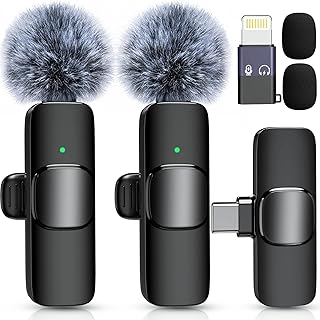

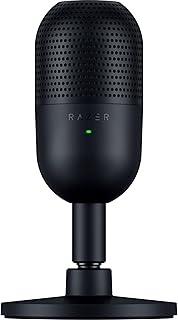


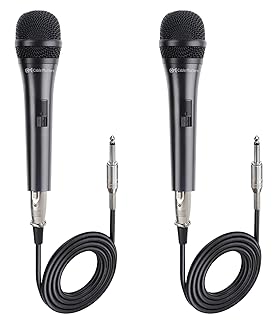


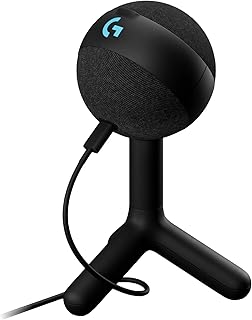


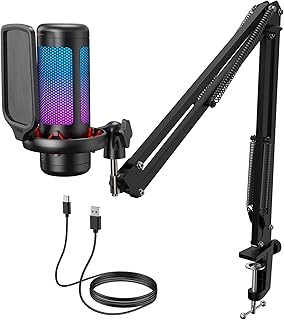


Choosing the right microphone is less about finding a single product that is best for everyone and more about matching the microphone to the way it will actually be used. A microphone for podcasting has different priorities from one intended for gaming, live vocals, studio recording, streaming, video calls or voice-over work. Connection type, polar pattern, sensitivity, frequency response, monitoring options, mounting arrangements and the recording environment can all affect the result. This guide provides a deeper framework for comparing microphone products in the UK. Rather than focusing on one specification in isolation, consider how the complete microphone system will work together: microphone, stand or boom arm, cable, interface or computer, headphones, room acoustics and recording software. A technically impressive microphone can still be a poor choice if it does not suit the room, voice, equipment or workflow. One of the most important decisions when comparing microphones is whether you need USB connectivity or an XLR-based setup. A USB microphone can be attractive because the connection is simple. For a user who wants to record a podcast, stream games or improve voice quality for online meetings without assembling an audio system, USB can provide a relatively uncomplicated route into higher-quality recording. An XLR microphone normally forms part of a wider audio chain. The microphone connects to an audio interface or mixer, which then connects to the computer or recording equipment. This approach introduces additional equipment but can provide greater flexibility when upgrading microphones, adding multiple inputs, changing preamps or building a more traditional recording setup. The dynamic-versus-condenser decision is frequently misunderstood. Neither technology is universally superior. The better choice depends on the sound source, recording environment, required sensitivity and intended application. Dynamic microphones are commonly associated with vocals, broadcasting, live performance and speech recording. Their characteristics can make them useful in environments where background noise and room reflections are difficult to control. For a home office, bedroom studio or gaming setup with fans, keyboards, nearby traffic or untreated walls, a suitable dynamic microphone can sometimes be easier to manage than a highly sensitive condenser microphone. However, microphone placement and technique remain important. Condenser microphones are often selected when detailed sound capture is a priority. They are widely used for vocals, instruments, voice-over and controlled recording environments. The additional sensitivity can be an advantage when the surrounding room is quiet and acoustically suitable. It can also become a disadvantage if the microphone captures unwanted reflections, computer fans, household activity or street noise. A microphone's polar pattern describes how it responds to sound arriving from different directions. This is an important specification when deciding where the microphone should be positioned and how much surrounding sound should be captured. Cardioid microphones primarily favour sound arriving from the front while reducing sensitivity towards the rear. This makes the pattern particularly useful for individual speakers, singers, streamers, podcasters and many recording applications. Omnidirectional microphones are designed to capture sound from a broad range of directions. They can be useful for situations where natural room sound or speech from multiple positions needs to be recorded. Bidirectional microphones favour sound from the front and rear while reducing sound arriving from the sides. This pattern can be useful for certain interview and face-to-face recording arrangements. Some microphones provide multiple selectable polar patterns. These can be useful when one microphone needs to support different recording scenarios. The flexibility can be valuable, but it should not automatically outweigh the importance of microphone quality, placement and suitability for the primary use case. Buying a better microphone does not automatically produce better recordings. Placement can have a substantial effect on clarity, bass response, room sound and unwanted noise. For speech recording, position the microphone at an appropriate distance and angle rather than placing it directly against the mouth. Speaking slightly across the microphone rather than directly into it can help reduce strong plosive sounds. A pop filter or suitable windscreen can provide additional protection against bursts of air from sounds such as “p” and “b”. Distance also affects the balance between direct voice and room sound. Moving closer generally increases the proportion of direct sound, while moving farther away allows more of the surrounding room to enter the recording. The exact result depends on the microphone's design and polar pattern. Frequency response describes the range of frequencies a microphone is designed to capture and how strongly it responds across that range. It is useful when comparing specifications, but the widest published frequency range is not necessarily the best reason to choose a microphone. For spoken voice, the qualities that matter in practice include intelligibility, natural tone, control of excessive bass, presence and how the microphone behaves with the particular speaker. For music, the instrument, performance style, room and desired recording character become equally important. When comparing microphones, treat frequency-response figures as one part of the specification rather than a standalone quality score. Sensitivity indicates how strongly a microphone responds to a given sound level. A more sensitive microphone is not automatically better. What matters is whether its sensitivity suits the source and the equipment connected to it. Maximum sound pressure level, where specified, is another useful consideration for loud sources. Musicians recording powerful vocals, drums or amplified instruments should pay attention to how the microphone is intended to handle high sound levels. For quiet sources such as voice-over, acoustic instruments or softly spoken narration, microphone noise performance can become more important. Self-noise refers to the noise generated by the microphone itself. However, the total noise floor of a recording is influenced by the complete signal chain and environment. Computer fans, air conditioning, room reflections, electrical interference, poor gain settings and nearby appliances can all affect the final recording. XLR microphones normally rely on an audio interface or mixer for preamplification. Some microphones require more gain than others. If the interface has insufficient clean gain for a particular microphone, the user may need to raise the gain substantially, potentially making system noise more noticeable. This is one reason specifications should be evaluated as a system rather than in isolation. A microphone that looks attractive on paper may require supporting equipment that changes the overall cost and complexity of the setup. Many condenser microphones connected through XLR require phantom power, commonly supplied by compatible audio interfaces and mixers. USB microphones handle their power requirements through their connection to the host device. Before buying an XLR condenser microphone, confirm that the intended interface or mixer supports the required power arrangement. Do not assume that every microphone connection provides every form of power automatically. For podcasting, streaming and voice recording, headphone monitoring can be extremely useful. A microphone with a dedicated headphone output may allow the user to monitor the microphone signal directly. Zero- or low-latency monitoring can be particularly valuable because it reduces the distracting delay that can occur when audio is routed through a computer and software before reaching headphones. Connection standards should be checked carefully before purchase. A microphone may use USB-C while the computer or recording device uses another connector, making cable compatibility or an appropriate adapter important. Also check whether the supplied cable is detachable and whether replacement cables can be obtained easily. A removable cable can be convenient for storage, transport and future replacement. The mounting system is an overlooked part of microphone selection. A good microphone can be difficult to use if its stand is unstable or occupies too much desk space. Pop filters and windscreens have different designs but share the broad purpose of managing unwanted air movement and mechanical noise. A pop filter is particularly useful for close-miked speech and vocals because plosive consonants can create sudden bursts of air. A foam windscreen may also help manage airflow and provide protection from dust or moisture in appropriate applications. Before spending substantially more on a microphone, consider the room in which it will be used. Hard floors, bare walls, windows and large reflective surfaces can create reflections that make speech sound distant or boxy. Simple changes to the recording environment can sometimes make a meaningful difference. Soft furnishings, curtains, rugs, suitable furniture placement and sensible microphone positioning can reduce some unwanted reflections. A microphone should not be selected solely on the assumption that it will “remove” poor room acoustics. Directional microphones reduce sound from certain directions, but they do not magically eliminate reflections or background noise. Podcasting usually benefits from clear speech reproduction, convenient positioning, reliable connectivity and practical monitoring options. Gaming and streaming setups often require a balance between voice clarity, desk space, convenience and background-noise management. Voice-over work places greater emphasis on consistent speech capture, low unwanted noise and an acoustically controlled recording environment. Instead of choosing a microphone purely because it is marketed for voice-over, compare its sensitivity, noise characteristics, connection requirements, frequency response and compatibility with the recording equipment. The speaker's voice also matters: a microphone that sounds balanced with one voice may produce a different result with another. For musical applications, the appropriate microphone depends heavily on the instrument and recording environment. A microphone intended for spoken word is not necessarily the ideal choice for a singer, guitar, drum kit or amplified cabinet. Consider the sound pressure level, microphone type, polar pattern, frequency response and placement options. For studio recording, also consider whether the microphone is compatible with the available interface and whether phantom power is required. For video calls and remote work, ease of use can be more important than advanced studio specifications. USB microphones can be convenient where a computer is the main recording device. Good positioning remains essential. A microphone placed too far away may encourage the user to increase gain, which can make room noise more noticeable. Placing the microphone at a sensible distance and reducing unnecessary background noise can improve speech clarity. When researching microphone products, it is useful to compare established manufacturers alongside newer options rather than assuming that one brand is automatically best for every application. When comparing two or more microphones, avoid judging them solely by the number of specifications listed. Instead, identify the specifications that directly affect your intended use. The cheapest microphone is not necessarily the best value, while the most expensive microphone is not automatically the best choice. Consider the complete system cost and whether the microphone actually solves the user's main recording problem. A sensitive microphone can expose room reflections and background noise. Before upgrading, identify whether the problem is actually microphone quality or the recording environment. An XLR microphone may require additional equipment. Check the complete connection chain before purchase rather than assuming that the microphone can connect directly to a standard computer USB port. A broad frequency range does not guarantee a recording that sounds better for your voice or application. Other characteristics and the complete recording environment matter. Even a high-quality microphone can produce poor results when it is positioned too far away, pointed incorrectly or placed where unwanted mechanical noise reaches it. Large microphones, stands and boom arms can dominate a compact workspace. Check dimensions and mounting requirements before choosing equipment. Check operating-system compatibility, connection requirements, available ports and the intended recording device. Compatibility should be confirmed before purchase. There is no universal spending level that guarantees the right result. The appropriate budget depends on the application and the rest of the setup. A basic computer microphone may be sufficient for occasional calls. A content creator may benefit from investing in a better microphone, mounting system and headphones. A serious recording setup may need an XLR microphone, audio interface, monitoring equipment and suitable acoustic treatment. For this reason, compare the total cost of ownership rather than the microphone alone. A seemingly inexpensive XLR microphone can become a more substantial purchase once an interface, cable, stand and other accessories are included. If your existing microphone sounds disappointing, test the setup before replacing it. Move the microphone closer while maintaining a comfortable speaking position. Experiment with the angle to reduce plosives and unwanted breath noise. Lower background noise where possible, reposition fans and avoid placing the microphone directly on a vibrating desk surface. Also check recording levels. Excessively low levels followed by heavy software amplification can expose background noise, while excessively high levels can cause clipping. Aim for a clean recording with sensible headroom rather than trying to make the waveform as large as possible. Microphones should be handled carefully and stored in a clean, dry environment when not being used. Avoid dropping the microphone, pulling cables aggressively or exposing sensitive components to unnecessary moisture. Customer reviews can be useful, but they are most valuable when read alongside specifications and your own requirements. Look for recurring comments about the same practical characteristics rather than relying on a single enthusiastic or negative review. Pay particular attention to feedback concerning connectivity, compatibility, build quality, controls, mounting, background noise and ease of use. Also consider whether reviewers are using the microphone for the same purpose as you. A complaint from a studio musician may have little relevance to someone buying a USB microphone for occasional video calls. If the recording environment contains significant background noise, consider the microphone's directionality, placement and sensitivity before choosing a model. A microphone positioned close to the speaker can increase the proportion of direct speech relative to distant environmental sound. However, no microphone should be expected to eliminate all unwanted noise. Turning off unnecessary fans, closing windows, moving away from noisy equipment and choosing a quieter recording time can often be just as important as microphone selection. Small rooms require careful consideration because sound reflections can become noticeable. A microphone with an appropriate directional pattern can help, but placement remains crucial. Consider where the microphone will sit, where the speaker will face, what surfaces are nearby and whether the recording area contains curtains, carpets, furniture or other materials that influence reflections. A compact boom arm may also be preferable when desk space is limited. For mobile recording, portability becomes a major consideration. Look at the microphone's physical size, weight, connection requirements, cable arrangement and protection during transport. USB microphones can be convenient for computer-based travel setups, while compact lavalier and camera-oriented microphones can be more suitable for video production. Wireless systems may be useful where movement is important, but compatibility and battery arrangements should be checked carefully. Construction quality matters particularly when a microphone will be transported frequently or used in demanding environments. Metal housings can provide a robust physical structure, while plastic components can reduce weight and sometimes make a product easier to handle. Do not judge durability solely by the material listed in a specification. Pay attention to connector construction, control quality, mounting points, cable arrangement and the overall design of the microphone. Size and weight are not merely aesthetic considerations. A heavy microphone can place greater demands on a boom arm, desk clamp or stand. A large microphone may also obstruct a monitor or camera view. Before purchasing, check the physical dimensions and consider the exact location where the microphone will be installed. This is particularly important for compact desks and multi-monitor workstations. Not necessarily. Extra controls and recording modes can be useful when they solve a genuine need, but unnecessary features can increase complexity and cost. A user who only records a single voice through a computer may gain more from a reliable, easy-to-position microphone than from a complicated multi-pattern system. Conversely, a creator producing podcasts, interviews and different recording formats may benefit from greater flexibility. There is no single best microphone for every user. The right choice depends on the intended application, recording environment, connection type, voice or sound source, mounting arrangement and budget. Neither is universally better. USB is convenient for direct computer recording, while XLR is generally more appropriate for users who want an expandable audio system involving an interface or mixer. A suitable dynamic microphone can be a practical choice in a noisy environment, particularly when used close to the speaker, but microphone placement and reducing the source of the noise remain important. Condenser microphones are widely used for vocals because of their sensitivity and detailed capture, but suitability depends on the singer, room, recording style and microphone characteristics. In most computer-based XLR recording setups, an audio interface or mixer is needed to provide an appropriate microphone input and connection to the recording device. Check the requirements of the specific microphone and equipment. Cardioid is a common choice for a single speaker because it favours sound from the front while reducing sensitivity from much of the rear. The ideal pattern still depends on the recording environment and microphone position. A pop filter can be useful for close speech and vocal recording because it helps reduce plosive bursts of air. Whether one is necessary depends on the microphone, speaker position and recording style. No. Microphone suitability depends on the speaker, source, room, positioning and recording chain. A more expensive microphone can be a poor choice if it does not suit the application. Yes, provided it is compatible with the gaming setup and can be positioned appropriately. The main consideration is whether its connection, controls and recording characteristics suit the user's computer and environment. Keyboard noise can reach the microphone through the air or through mechanical vibration transmitted by the desk and mounting system. Microphone positioning, polar pattern, isolation and gain settings can all affect how noticeable it becomes. Muffled sound can result from microphone positioning, excessive distance, incorrect orientation, unsuitable frequency characteristics, processing settings or an issue elsewhere in the recording chain. Check positioning and software processing before replacing the microphone. Echo or excessive room sound is often associated with reflections from hard surfaces. Moving closer to a suitable microphone and improving the recording environment can help reduce the amount of reflected sound captured. There is no universal distance because microphones differ in design and polar pattern. Position the microphone close enough for a strong direct voice signal while avoiding excessive plosives, breath noise and proximity-related bass buildup. No. Specifications provide useful technical information, but they should be considered alongside intended use, room conditions, mounting, connectivity, compatibility and credible customer feedback. The best microphone purchase is the one that fits the complete recording situation rather than simply having the longest specification sheet or highest price. Start by identifying what you need to record, where you will record it and what equipment you already own. For straightforward computer recording, USB can offer a convenient route. For an expandable recording system, XLR may make more sense. Dynamic microphones can be practical for many speech and live applications, while condensers can provide detailed capture in suitable environments. Polar pattern, placement and room acoustics should be treated as central buying considerations rather than afterthoughts. Before purchasing, compare specifications carefully, read verified customer reviews relevant to your intended use, check compatibility and mounting requirements, and confirm current retailer pricing and availability. A little additional research can prevent the common mistake of buying a microphone that is impressive on paper but poorly suited to the actual way it will be used.
How to Choose the Best Microphone for Your Needs in the UK
Quick Guide to Microphone Types
USB Microphones vs XLR Microphones
Dynamic vs Condenser Microphones
Dynamic Microphones
Condenser Microphones
Understanding Polar Patterns
Cardioid
Omnidirectional
Bidirectional
Multi-Pattern Microphones
Why Microphone Placement Matters So Much
Frequency Response: What It Tells You
Sensitivity and Maximum Sound Pressure Level
Self-Noise and Signal-to-Noise Considerations
Gain, Preamps and Why More Gain Is Not Always Better
Phantom Power Explained
Headphone Monitoring and Zero-Latency Features
USB-C, USB-A and Connectivity Considerations
Microphone Stands, Boom Arms and Desk Mounts
Pop Filters and Windscreens
Room Acoustics Can Matter More Than the Microphone Upgrade
Best Microphone Features for Podcasting
Best Microphone Features for Gaming and Streaming
Best Microphone Features for Voice-Over
Best Microphone Features for Vocals and Music
Best Microphone Features for Online Meetings
Microphone Brands Worth Comparing
How to Compare Microphone Specifications
Microphone Buying Mistakes to Avoid
Choosing Solely on Price
Ignoring the Room
Buying XLR Without an Audio Interface
Focusing Only on Frequency Range
Ignoring Microphone Position
Forgetting Desk Space
Assuming Every USB Microphone Works Everywhere
How Much Should You Spend on a Microphone?
Microphone Accessories That Can Improve a Setup
How to Check Whether a Microphone Will Fit Your Existing Setup
How to Get Better Sound Without Buying a New Microphone
Microphone Maintenance and Care
Microphone Comparison Checklist
How to Compare Customer Reviews Properly
What Matters Most for Different Users?
Choosing a Microphone for a Noisy Room
Choosing a Microphone for a Small Home Studio
Choosing a Microphone for Travel and Mobile Recording
Microphone Build Quality and Materials
Understanding Microphone Size and Weight
Are More Microphone Features Always Better?
How to Narrow Down the Best Microphone Options
Frequently Asked Questions About Microphones
What is the best microphone?
Is USB or XLR better?
Is a dynamic microphone better for a noisy room?
Are condenser microphones better for vocals?
Do I need an audio interface for an XLR microphone?
What polar pattern should I choose for one person?
Do I need a pop filter?
Does a more expensive microphone always sound better?
Can I use a studio microphone for gaming?
Why does my microphone pick up keyboard noise?
Why does my microphone sound muffled?
Why does my recording sound echoey?
How close should a microphone be to my mouth?
Are microphone specifications enough to choose a product?
Final Microphone Buying Advice
Microphone Buying Checklist for UK Shoppers